
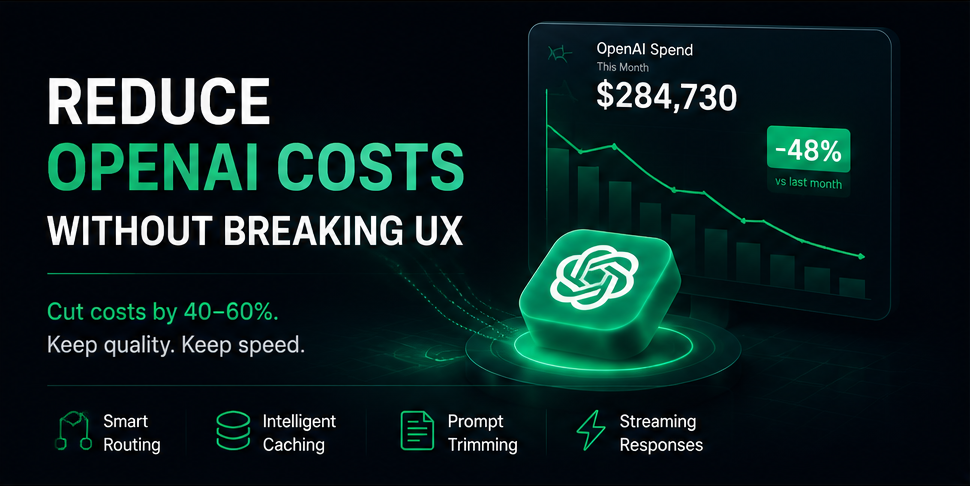
Cutting OpenAI spend by 40–60% while keeping quality and speed intact.
Your OpenAI bill doubled last month and nobody noticed until finance flagged it. Sound familiar?
Usage-based pricing is great for prototyping and brutal at scale. A single call costs a fraction of a cent — but a product serving tens of thousands of daily users can burn through hundreds of millions of tokens a month before anyone sees the spike.
The obvious fix — cheaper model, aggressive caching, trimmed prompts — works. The trap is doing it blindly. Every cost lever you pull can quietly degrade the thing your users actually feel: response speed and answer quality. This guide covers how to bring the bill down while keeping the experience intact.
The short answer
You can usually cut OpenAI spend by 40–60% without hurting UX by combining four moves: route each request to the smallest model that passes your quality bar, cache what repeats, trim what you send, and stream what you return — then monitor quality and latency so you catch regressions before users do.
Cost and experience aren't a trade-off here. They're optimized together, or not at all.
Why this matters beyond the invoice
LLM spend isn't just a line item. It sets your gross margin on every AI feature, it caps how many users you can serve profitably, and — because it's usage-based — it turns a viral week into a budget emergency.
Latency compounds the problem. Users start abandoning interactions after a few seconds of waiting, so the "cheaper" path that adds two seconds of round-trip can cost you more in churn than it saves in tokens. Cost, reliability, and UX are the same problem viewed from three angles — which is exactly why treating them as one monitoring problem (not three separate dashboards) matters. More on that below.
What teams usually get wrong
Running everything on the flagship model. Classification, extraction, and routing don't need frontier reasoning. Paying flagship rates for a summarization task is the single most common source of waste.
Cutting cost by silently downgrading quality. Swapping to a cheaper model or loosening a cache threshold with no evaluation in place means the first person to notice the drop is a customer — not you.
Ignoring perceived latency. A model that's 30% cheaper but streams poorly feels slower even when total time is similar.
Optimizing without measurement. Teams tune prompts and models by vibes, ship, and never confirm whether quality held.
What to monitor while you optimize
Before you touch anything, make sure you can see the trade-off you're about to make:
- Cost and token volume per feature or route
- Response latency — specifically time-to-first-token for streamed responses
- Error and timeout rates on model calls
- Output quality and safety signals: relevance, hallucination indicators, toxicity, PII leakage, prompt-injection attempts
- Cache hit rate, and the false-match rate that comes with it
This is the step most teams skip — and it's the one that turns "we cut costs" into "we cut costs and it held up."
A step-by-step framework
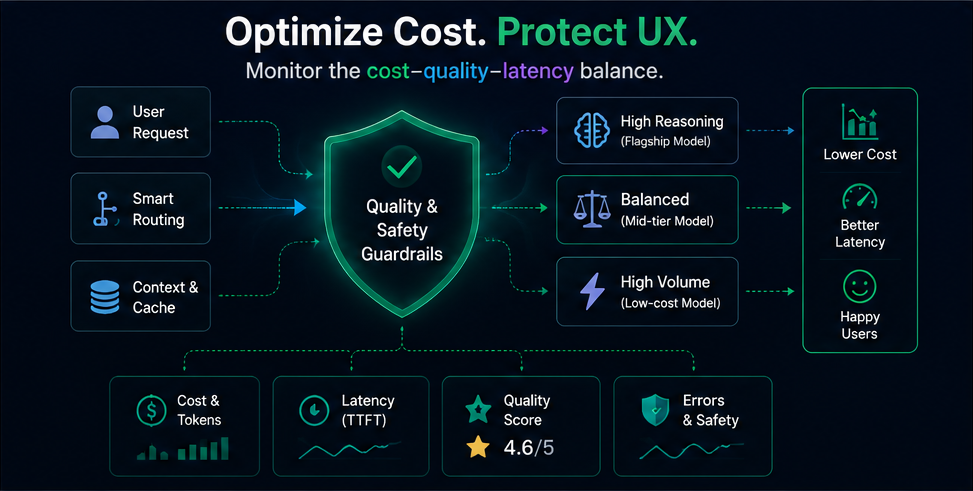
Smart routing sends each request to the right model tier — while cost, latency, quality, and safety stay monitored end to end.
1. Route by task complexity
Map each call to the smallest capable model. As of mid-2026, OpenAI's lineup spans a wide price ladder — high-volume classification, extraction, and routing can run on a low-cost tier, while only genuinely hard reasoning, coding, or agentic work needs a flagship tier. Start cheap, escalate only when your evaluations show a measurable quality gap. (Confirm current model names and prices on OpenAI's pricing page before publishing internally — this ladder shifts often.)
2. Cache what repeats — at two levels
Prompt caching: OpenAI discounts repeated prompt prefixes heavily (cache reads run roughly 90% cheaper on recent models). Put your stable system prompt and shared context at the front so it's cacheable.
Semantic caching: For repetitive user queries (support, FAQ, docs search), store query embeddings and serve a cached answer when a new query is close enough in meaning. This can eliminate a large share of calls entirely and returns in milliseconds — a cost win and a latency win. Tune the similarity threshold carefully: too loose and you serve wrong answers, too tight and hit rates collapse.
3. Trim the tokens
Shorten system prompts, drop redundant context, cap max_tokens, and retrieve only the most relevant chunks in RAG rather than stuffing the window. Output tokens usually cost several times more than input tokens, so tightening responses matters most.
4. Batch the non-urgent
Anything that doesn't need a real-time answer — evals, backfills, nightly summaries — belongs on the Batch API, which takes a flat ~50% off. It never touches the interactive path, so there's zero UX cost.
5. Protect perceived latency with streaming
For anything a user waits on, stream tokens so the answer starts appearing immediately. Perceived speed is what users judge — streaming lets a cheaper or slightly slower model still feel responsive.
6. Add automatic failover
When a provider is slow or erroring, fall back to an alternate model or a cached response instead of hanging. Reliability and UX stay intact even when cost optimization introduces more moving parts.
How Watchlog helps
Every move above trades one risk for another: a cheaper model might hallucinate more, an aggressive cache might return stale or off-topic answers, a trimmed prompt might drop a guardrail. The failure mode is silent — output quality degrades without an error ever being thrown.
That's the exact gap Watchlog's Generative AI Monitoring is built to close. It's a real-time observability layer purpose-built for teams running LLMs in production, tracking ten specialized signals across every model call:
- Hallucination scoring — quality drift across LLM, semantic, and final outputs
- PII detection — automatic classification of PII in prompts and responses
- Prompt injection risk — guardrail coverage and risk scoring for malicious inputs
- Text similarity & relevance — distribution and stability vs. expected output
- Toxicity & sentiment — polarity, emotional drift, multi-level risk buckets
- Readability & topic classification — safety and volume scoring across themes
It works across OpenAI, Anthropic, Google DeepMind, Cohere, Mistral, Groq, and Amazon Bedrock, with alerts routed through Slack, Telegram, or custom webhooks the moment a threshold is crossed.
So when you route a workload to a cheaper model or loosen a cache, you're not guessing whether quality held — you get a scored, real-time answer before a customer files a ticket.
And because Watchlog is a full-stack platform, GenAI signals sit next to APM traces, infrastructure health, and alerting in one dashboard — so a quality dip that lands right after a model swap or a deploy is trivial to spot, instead of buried in a separate tool. If your stack already runs on MongoDB, Redis, Postgres, or Docker, those signals live in the same place too.
Where it fits your budget: Generative AI Monitoring starts at $49/month for up to 100K model calls (hallucination + PII detection, email/Slack alerts), scales to $199/month for 1M calls with prompt-injection and toxicity alerts, and goes custom at enterprise scale with dedicated infrastructure and SSO.
See Generative AI Monitoring in action →
Example scenario
A support-assistant SaaS is spending heavily running every reply on a flagship model. The team routes routine intent-classification and FAQ answers to a low-cost tier, adds semantic caching for the top few hundred repeated questions, and moves nightly transcript summarization to the Batch API.
Projected spend drops sharply. Instead of shipping and hoping, they watch relevance and hallucination signals on the cheaper path for a week: relevance holds, so the change stays. If it had dropped, they'd have caught it in days — not in churn.
Comparison: how teams approach this
| Approach | Strength | Trade-off |
|---|---|---|
| DIY dashboards + logs | Full control | You build and maintain the quality-evaluation layer yourself |
| AI-only observability tools | Strong on LLM traces | Often a separate silo from infrastructure and app monitoring |
| Enterprise all-in-one platforms | Comprehensive | Usually the exact cost and complexity you're trying to escape |
| Watchlog | Unified quality/safety GenAI monitoring alongside infrastructure, APM, and app signals | Not a replacement for every dedicated eval tool in every scenario |
Watchlog is a practical fit for teams that want one place to confirm a cost cut didn't break the product — without standing up a separate LLM observability stack. See full pricing for how it compares across plans.
FAQ
Will using a cheaper OpenAI model hurt my product? Not necessarily — many tasks (classification, extraction, summarization) run fine on low-cost tiers. The safe way to find out is to route the task down and monitor quality signals for a week rather than switching blind.
Does prompt caching change my output? No. Prompt caching discounts repeated input prefixes; the model still generates a fresh response. Put stable content at the front of the prompt to maximize cache hits.
Is semantic caching risky for UX? It can be, if the similarity threshold is too loose and you serve a near-but-wrong answer. Tune the threshold, monitor false matches, and use it where identical answers are acceptable.
What's the fastest way to cut cost without touching UX at all? Move non-interactive work (evals, summaries, backfills) to the Batch API and enable prompt caching. Neither affects the real-time path.
How do I know a cost change didn't quietly reduce quality? Track quality and safety signals — relevance, hallucination, toxicity, PII — before and after the change, and correlate them with deploys and model swaps. Generative AI Monitoring does this automatically and alerts you when a signal crosses threshold.
Start monitoring your AI stack
Cutting your OpenAI bill is the easy part. Knowing it didn't cost you quality is the part that actually protects your product.
Start Free on Watchlog → — no credit card required Talk to Sales about Gen AI Monitoring → — for teams ready to scale AI observability